Showing posts with label data recovery. Show all posts

Monday, October 8, 2018

FAQ Video Series: PC/Windows Computer Forensics


October 8, 2018

FAQ Video: PC/Windows Computer Forensics

In this video, we cover some over our FAQ about Windows-based computer forensics, including Metadata.  Simply put, metadata is data about data, such as authorship/ownership, dates & times of file creation/modification/access and a plethora of other valuable information. 


A majority of our computer forensic cases are for Windows-based PCs and certain processes are different for PCs than for Mac (Apple) computer.  When researching a forensic examiner, be sure to ask the questions to determine which analyst possesses the right knowledge, experience, training and tools for your specific needs.  There nuances that affect every case which relate to the specific hardware and software involved.

Do you have a case that might be helped by a digital forensic analysis?  Visit our website, call or email for a free consultation:

Pro Digital Forensic Consulting
804-588-9877


Monday, August 27, 2018

I Lost My Data!


 August 27, 2018

I Lost My Data!

Recently I was invited to attend an Instructor Development Course (IDC) for a well-known, global digital forensics company, for which training is a component of their business.  The IDC was run by two of the managers of training and, having attended other IDC’s (or train-the-trainer classes) in the past, I knew the rough format would be a review of the material to be taught and some sort of teach-back or presentation. Turns out, I was right!

On day one of the IDC, the 6 participants in the class were chosen by lottery to pick a random topic upon which to present on the afternoon of day three of the class.  I drew topic #3 of 6, so my randomly drawn topic was “File Headers and Signatures.”  Not bad.  Far better than numbering systems or 7-bit PDU encoding, if you ask me!  So I got to work on my presentation that evening.  The length was to be 20-25 minutes. We could use whatever resources we need and they had to facilitate the presentation.  No biggie, but I wanted to be prepared and well-versed because having given dozens of presentations in the past and having it reinforced during the first two days of the IDC, I know that’s what makes a good presentation – Preparation!

So I spent a few hours putting together what I thought was a clever presentation on File Signatures & Headers.  What they are, what they look like, how they can be utilized, how automated tools find files using them, how we can manually search using them within a particular tool and how to validate our findings.  It was pretty good.  By the time afternoon of the final day came around, I tweaked and adjusted and walked through the presentation multiple times.  After all, I didn’t want to screw up the opportunity to teach for this company, because it’s a fantastic opportunity!  Then, Murphy paid a visit (no, not the well-known Forensicator Cindy!)…

The Wheels Come Off

When constructing the original presentation in my hotel room, I composed it on a 17” MacBook Pro with Bootcamp on the Windows partition running Windows 7 Pro in MS Power Point.  Everything went smoothly.  The presentation was saved on an 8 GB USB 2.0 thumb drive formatted in FAT 32, which was a marketing freebie (first clue, perhaps?) and previously unused.  When I refined, tweaked and updated the presentation, I did so on a MacBook Pro 15” retina on Mac OS High Sierra, also in MS Power Point.  There were no issues reading or saving the presentation, or so I thought.

When it came time for me to present, I popped up out of my chair, properly ejected the thumb drive from the MacBook Pro and brought it into the presentation room along with my other necessary materials.  I plugged my thumb drive into the presentation computer and this is what I saw:


My heart sank.  I clicked “Cancel” only to be presented with this from Windows:


So I thought maybe, just maybe, I could get it to work on the MacBook Pro.  So I ejected the drive from the PC and plugged it into the Mac, which was the last computer to touch the presentation.  Here’s the message I received:


A series of expletives began to spew forth from my mouth, or at least that’s how it felt.  But I do forensics for a living, right?  I have to know SOME way to recover this presentation! 
I knew the original 17” MacBook Pro, which is my backup forensic laptop as well, was back at the hotel room with a box full of dongles.  Something in my forensic bag of tricks MUST work, right? 

I told the other two students to go ahead of me and raced back to the hotel to work my forensic data recovery magic on the thumb drive and recover my presentation.  I was sure I had my X-Ways Forensics license with me!  That’ll get it in no time!  Except I didn’t.  Any tools I brought me were either for Mac forensics or mobile devices, neither of which had the capability to recover anything off of this thumb drive, at least not quickly.  I searched for auto-saved documents on both Windows and Mac.  No dice.  I searched the extended metadata in Mac.  Nothing found.  I Googled locations of temp files and other potential sources of auto-save or system-generated copies, whether hidden or not.  No luck.  So after about 40 minutes of trying what I could with what I had, I resigned myself to the reality of the situation:  I either had to try and re-construct the presentation from memory or go without a Power Point, which would have looked horribly unprepared and unprofessional. 

Fortunately, the last student before me had about 25 minutes left to go when I got back to the training site, so I hurriedly composed what I could remember from my previous presentation and got it about 85% of the way to where it was before it was my turn to present.  I did it and it turned out very well.

But what about the original presentation?

The Recovery

I’m an investigator at heart.  I want to get to the truth of the matter, no matter what the truth may tell me.  And yes, curiosity and tenacity play a pretty big role in that.  So instead of trashing the thumb drive in frustration, I decided to see if the original presentation was on there.  Back at my office (where my X-Ways license was the whole time), I created an image of the thumb drive in X-Ways. 


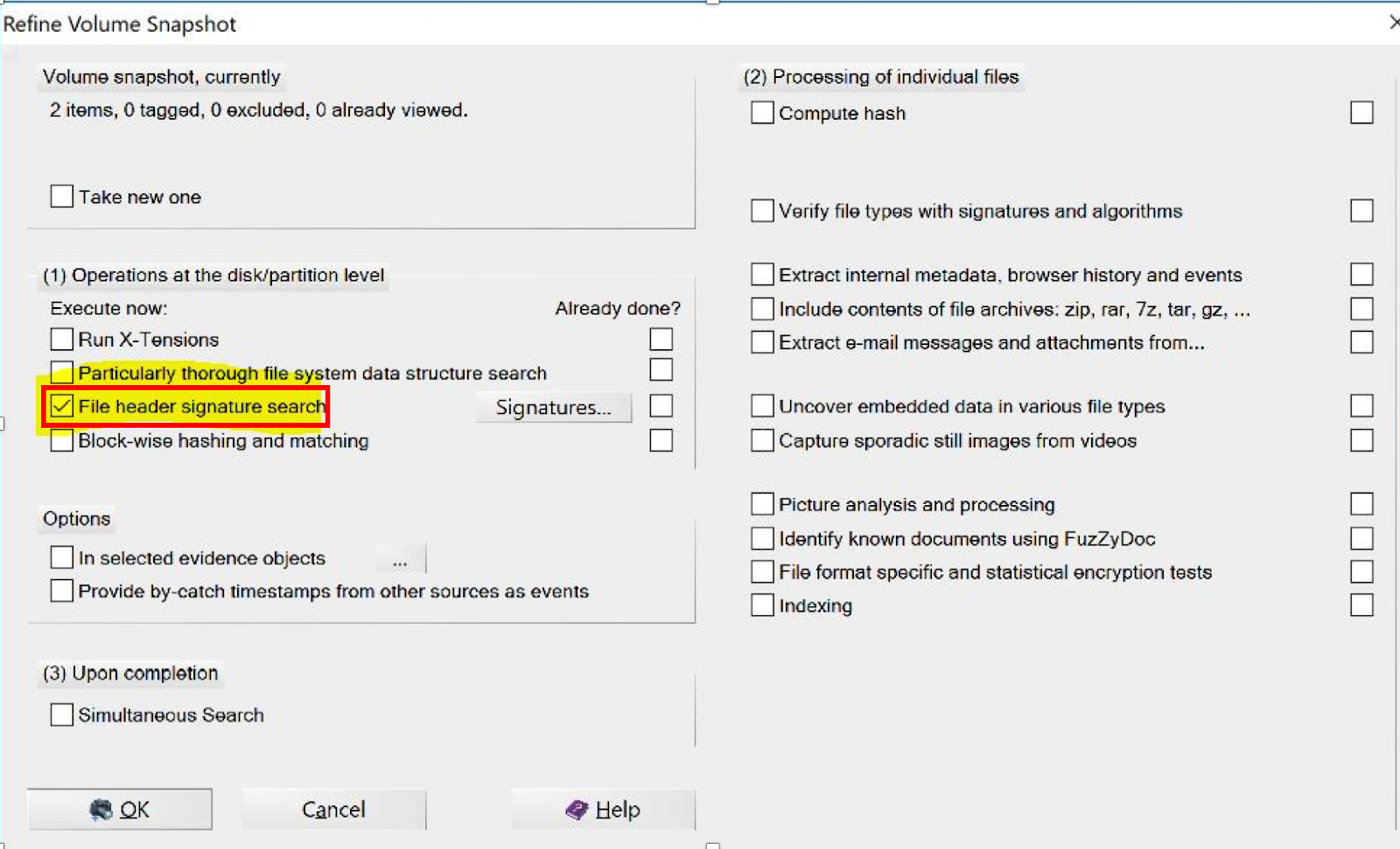
Once the image was created, I used the Refined Volume Snapshot to conduct a File Header Signature search.  Hmm, this is sounding a lot like my presentation!


For the sake of time and because I already know what I’m looking for, I only searched for MS Office Documents.  It didn’t take long…


Sure enough, after a few minutes, X-Ways carved not one, but three copies of my presentation on the disk.  They are all of different size and contain slightly different data:


Yes, that’s page one of my presentation.  And yes, that’s a bust of Dick Butkus from the Pro Football Hall of Fame.

Being that the presentation was about file signatures and headers, I decided to double-check the header on the recovered files.  A quick Google search reveals that the file header for a .PPTX (or Power Point) file in hex is: 50 4B 03 04 14 00 06 00.  Cross-referencing that with the data of the recovered files reveals the same header, serving to further validate the findings:


Wrapping it Up

I know this example of data recovery is very basic.  Would it were that all data recovery jobs were this simple!  But the principles and procedures detailed here are the same whether we’re dealing with an 8 GB thumb drive (FAT 32) partition or a 4 TB hard drive with multiple partitions.  Hardware and software are the variables.  The constants are the procedures and methods used to acquire, analyze, carve, locate and report the lost data.  Ultimately, these methods need to be repeatable and defensible in a court of law because that’s what “Forensics” means.

Not every job is this straight-forward or simple, but with a little problem-solving, tenacity and experience, a competent examiner can put these methods to work to help recover just about any lost data!

Author:
Patrick J. Siewert
Principal Consultant
Professional Digital Forensic Consulting, LLC
Virginia DCJS #11-14869
Based in Richmond, Virginia
Available Wherever You Need Us!


We Find the Truth for a Living!

Computer Forensics -- Mobile Forensics -- Specialized Investigation

About the Author:
Patrick Siewert is the Principal Consultant of Pro Digital Forensic Consulting, based in Richmond, Virginia.  In 15 years of law enforcement, he investigated hundreds of high-tech crimes, incorporating digital forensics into the investigations, and was responsible for investigating some of the highest jury and plea bargain child exploitation investigations in Virginia court history.  Patrick is a graduate of SCERS, BCERT, the Reid School of Interview & Interrogation and multiple online investigation schools (among others).  He is a Cellebrite Certified Operator and Physical Analyst.  He continues to hone his digital forensic expertise in the private sector while growing his consulting & investigation business marketed toward litigators, professional investigators and corporations, while keeping in touch with the public safety community as a Law Enforcement Instructor.
Email:  Inquiries@ProDigital4n6.com
Twitter: @ProDigital4n6

Wednesday, November 18, 2015

Sometimes, The Data Isn’t There (anymore)


November 18, 2015

Sometimes, the Data Isn’t There (anymore)

Being a digital forensic services provider in the private sector, we service a wide array of client’s needs.  It is fairly common for our clients to be involved in litigation and investigations ranging from divorce to employment disputes and other criminal and civil matters.  Many times, the evidence they’re looking for may have once resided on a mobile device, but upon performing the data extraction and analysis, we have to regrettably inform them that we cannot recover the data they are looking for.  Why does this happen, especially with mobile devices?  Let’s talk about it…


The first thing to realize is that deletion of data doesn’t get rid of the data, at least not completely.  Deletion simply tells the operating system that the data may be over-written when the operating system needs the space.  However, accessing the deleted data can be the problematic part.  Areas of particular interest to many of our clients are text and picture messages.  As I often tell attorneys when they call with these inquiries, the deleted data may or may not be there.  It really just depends on several factors.  They include:

1)      The type of device.  This goes back to the fight of the geeks: Apple or Android.  Apple is particularly popular and particularly secure with regard to deleted data.  Can we recover deleted text messages off an Apple iDevice.  Probably.  But several of these other factors also come into play.  Android devices are generally a little easier to recover deleted data because industry standard forensic tools will many times perform a full physical data extraction from the device, which means we get all deleted and non-deleted data.  Because Apple maintains propriety over the chipsets and algorithms on all devices newer than an iPhone 4, a full physical extraction is not currently possible… So whether or not we can get the deleted data on your Apple device is a big question that we won’t fully know the answer to until we perform an extraction and start our analysis.

2)      The capacity of the device.  The text (SMS) and picture (MMS) databases on mobile devices are somewhat flexible in size.  They will expand and contract, depending on the usage (see point 3).  However, if you buy a 16 GB iPhone or Android device, the overall memory capacity does become an issue, especially when taking point #3 into account.  We’ve had clients submit devices with over 44,000 text & picture messages in the database.  That’s a lot of space for text messages and if the database on your device is growing to a point where the operating system has to figure out where to store all of it, the likelihood that deleted messages will be over-written increases greatly.

3)      The level of usage of the device.  If you are seeking deleted messages from a user who doesn’t actually use the phone feature on their device and rather texts all of their communications, the likelihood that deleted messages will be over-written in time increases as well.  If the level of text database usage on the device is high, the priority of those deleted messages goes way down.

4)      The time in between the sending/receiving of the alleged messages of interest and when the mobile data extraction takes place.  If you’re interested in messages that have been deleted 8 months or a year prior to retaining a digital forensic consultant and the level of usage has been high on the device, the likelihood that we’ll recover those messages goes way down.  Again, it’s not impossible, but it does become less likely when combined with the other factors.  This is why we advise you to engage the services of a digital forensic consultant sooner rather than later.  The staleness of the data and potential spoliation becomes a greater concern as time goes on.


All Is Not Always Lost
One of the things we routinely have to do is come up with work-arounds for any number of problems that present themselves in cases.  In the case of lost deleted messages, we utilized one work-around that turned out great for our client.  

The client presented us with his iPhone 5s, which he claimed contained text messages from and ex-girlfriend who was claiming that he assaulted her.  His contention was that the content of the text messages exonerated him of this claim.  But when we went to examine the extraction, these messages, which were 5-6 months old and had been deleted, were not on the device.  However, in digital forensics, there’s more than one way to skin the proverbial cat. (don’t worry, we don’t actually skin cats in our lab)

The client indicated he backed up his iPhone on his computer at a time period much closer to the alleged incident.  So we incorporated our computer and mobile forensic skills to acquire that backup file and import it into the mobile forensic tools and voila!  There were the text messages that helped get him acquitted in the case.  Sometimes, it’s just that simple.  Sometimes, we need to try to access cloud data, synced data on a Mac or PC computer or other backup data to try and retrieve what we need, but just bear in mind that deleted is often combatted by archived.

What About Computers?

Computers are a different animal much of the time.  Most computers have greater memory capacity and more robust operating systems than mobile devices such as smart phones and tablets, so their potential data retention is much higher.  Just bear in mind that when something is deleted on a computer, just like on a mobile device, it is tagged for over-writing whenever the operating system needs it.  True deletion also removes much of the file-specific information like creation, modification and access dates & times.  Also consider that on a Mac or Windows computer, your files are still be recoverable if all you (or someone else) did was put it in the trash or recycle bin.  More & more, manufacturers are socially engineering users to put encryption into place by default, which will also have a greater impact on our ability to recover the data over time.  Even recovered deleted data, if it’s encrypted, doesn’t do anyone any good.


So at the risk of being overly repetitive, please call your digital forensic consultant sooner rather than later.  Once we have the extraction or forensic image (copy), the data is preserved and we can do all the analysis you need on it, even if it’s months down the road.  But having that proverbial ‘time capsule’ of your device could mean the difference between getting you what you need and not being able to access the data at all!


Author:
Patrick J. Siewert, SCERS, BCERT, LCE
Principal Consultant
Professional Digital Forensic Consulting, LLC
(Virginia DCJS #11-14869)
Based in Richmond, Virginia
Available Globally

We Find the Truth for a Living!

About the Author:
Patrick Siewert is the Principal Consultant of Pro Digital Forensic Consulting, based in Richmond, Virginia.  In 15 years of law enforcement, he investigated hundreds of high-tech crimes, incorporating digital forensics into the investigations, and was responsible for investigating some of the highest jury and plea bargain child exploitation cases in Virginia court history.  A graduate of both SCERS, BCERT, the Reid School of Interview & Interrogation and various online investigation schools (among others), Siewert continues to hone his digital forensic expertise in the private sector while growing his consulting & investigation business marketed toward litigators, professional investigators and corporations.
Twitter: @ProDigital4n6